


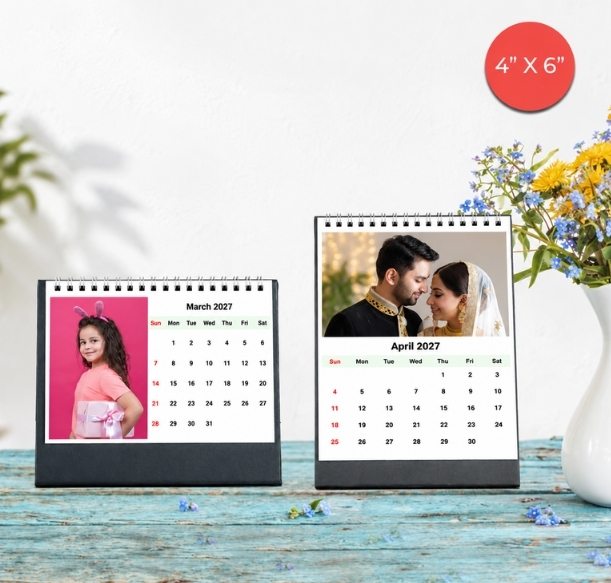


Choose the photos, check the dates and make a calendar that feels like their family.
A family calendar often starts with one good photograph. Then someone sends a wedding picture, a sibling finds an old holiday album, and suddenly there are seventy images to squeeze into twelve months.
The useful question is: which photographs would your parents or grandparents enjoy seeing throughout the year?
To make a family photo calendar, choose a format for the place it will sit or hang, collect original photographs, plan the monthly pictures and check every birthday and anniversary before ordering. For a simple layout with one main photograph each month, begin with twelve favourites and keep a few alternatives for awkward crops.
You can browse Photojaanic’s personalised photo calendars to compare the formats before you start. Here is how to turn a family photo collection into a thoughtful 2027 calendar.
Photojaanic 4×6-inch desk calendar examples
Table of Contents
- Start with where your parents will use it
- Gather photos from every household before you choose
- Use this twelve-photo plan if you cannot decide
- Arrange the photographs around people and memories
- Make a family date list before you open the design
- Check the photo area before you commit to a crop
- Make copies for different households carefully
- Order your family calendar on Photojaanic
- Frequently asked questions
Start with where your parents will use it
Think about the place where the calendar will live. A small table beside a chair calls for a different format from the wall where the whole household checks the date.
Ask a simple question if the gift need not be a surprise: “Would you prefer something for your table or something to hang up?” If it is a surprise, look at the calendar they already use.
| Where it will go | Format to consider | What to check first |
|---|---|---|
| A desk, bedside table or shelf | Desk calendar | Available surface space, viewing angle and whether the date grid is comfortable to read |
| A wall used by the household | Monthly wall calendar | Hanging space, page orientation and readability from the place it will be viewed |
| A spot where the whole year should stay visible | Poster calendar | The smaller month grids and how much space remains for the photograph |
For a table, explore personalised desk calendars. Photojaanic’s live selector includes 4×6, 4×10 and 6×8-inch options, plus selected split formats. Compare the actual layout as well as the dimensions: a wider calendar and an upright calendar arrange the picture and dates differently.
For a shared family space, browse photo wall calendar designs. The Classic wall calendar currently lists A4 and A3 in portrait and landscape, plus 9×11 inches. Sizes depend on the chosen design, so check its product page before collecting photographs around a particular shape.
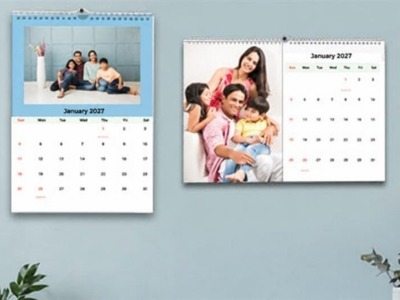
Photojaanic family photo wall calendar examples
Gather photos from every household before you choose
If several siblings or cousins are contributing, ask each household for a small selection of originals. One person can collect them in a folder and make the final calendar. That is a practical way to organise the family’s files; you do not need everybody working in the calendar editor at once.
Give people a specific request: a recent group photograph, a favourite everyday moment and one picture with the person receiving the gift. Ask them to send the original image file where possible, rather than a screenshot or a repeatedly forwarded copy.
A group chat is useful for discussing favourites, but the preview shown in the chat should not be the only copy you keep. When two versions of a photograph arrive, compare their file dimensions and sharpness. A larger file may preserve more detail, although size alone cannot rescue an out-of-focus picture.
Keep a short note beside each shortlisted image: who is in it, where it was taken and which household supplied it. This makes it easier to check spellings later and prevents one family branch from disappearing from the finished calendar simply because another sent more pictures.
Use this twelve-photo plan if you cannot decide
You do not need twelve formal portraits. A mixture of people, celebrations and ordinary afternoons often gives the calendar more variety.
Here is one starting plan for a calendar using one main photograph per month. Change the balance to suit your family and the available template.
| Photo group | Suggested number | What to look for |
|---|---|---|
| Whole-family pictures | 2 | A reunion, visit or meal where the main faces are clear |
| Smaller family groups | 3 | Different households or generations, including the recipients |
| Children, grandchildren or other loved ones | 2 | Recent photographs with expressions the recipients will recognise |
| Everyday moments | 2 | Gardening, cooking, reading, playing or an ordinary afternoon together |
| Celebrations | 2 | A birthday, wedding anniversary, festival or family achievement |
| An older memory | 1 | A photograph whose people and story can be identified |
That makes twelve main pictures. Keep two or three spare images in case a favourite loses a face when fitted into the chosen layout. If your design includes a separate photo cover or several image spaces per month, prepare additional files for those spaces.
For a grandparents’ calendar, give them a place in the photographs too. A picture of a grandchild learning a recipe with them can say more than another portrait of the child alone. For parents, include the activities and people they care about beyond their role as parents.
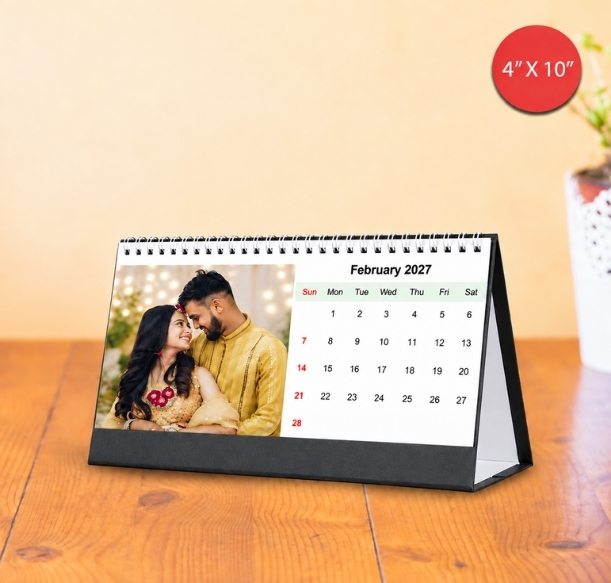
A 4×10-inch desk calendar with the photograph beside the dates
Arrange the photographs around people and memories
You can match a photograph to a birthday month, but you do not have to recreate the previous year month by month. A much-loved holiday picture can work in any month if it brings the right memory to mind.
Lay out twelve thumbnails before uploading. Check three things: whether the same person dominates, whether several nearly identical pictures sit together and whether everyone important to the recipient appears somewhere.
If a whole-family picture is followed by three more images from the same wedding, swap one for a quieter moment. If a family member lives far away, include a recent picture rather than relying only on the last reunion they attended.
An older photograph can be a lovely change of pace. Use the clearest scan available, keep its proportions and avoid enlarging a tiny face to fill a large area. If the source is soft, choose a smaller image area where the layout allows, or use a different photograph. Editing cannot recreate detail that the file does not contain.
Make a family date list before you open the design
Photojaanic’s desk and Classic wall calendar pages describe adding text to date boxes. Prepare that wording separately first, so you can check the facts without moving between months in the design.
For every event, record the person or occasion, the full date, the short label you want printed and the family member who confirmed it. For example, a birthday entry might read “18 March — Asha’s birthday”, once the person who knows the date has checked it.
Write the month in words in your working list. “4 May” is easier to verify than “04/05” when relatives use different date conventions.
Pay particular attention to:
- Birthdays that different relatives remember differently.
- Anniversary dates copied from an old invitation or message.
- Ages or anniversary numbers, which must match the calendar year.
- A birthday on 29 February: agree how the family wants to mark it in 2027.
- Festival dates that vary by year, region or the tradition your family follows.
Check any festival dates you add against a reliable 2027 source appropriate to the family. A pre-filled holiday list should still be reviewed for the recipient’s needs. Keep labels short enough to read comfortably inside the selected date box.
If you want names in an Indian script, check that your chosen design supports the text and that every character displays correctly in the preview. Have someone who reads that script check it before ordering.

Date personalisation illustrated on the Photojaanic product page
Check the photo area before you commit to a crop
A calendar’s overall dimensions do not tell you the shape of its photo space. A 4×6-inch calendar can contain a picture beside the dates in one orientation and above them in another.
Choose the template first, then inspect each photograph inside its actual image area. Look at the people nearest the edges. A group picture may appear to fit until the crop removes a grandparent standing at one side.
For a wide family group, try a landscape photo area. For a tall portrait, try a portrait layout. If fitting the picture requires heavy zooming or cuts off someone important, change the photograph or the layout.
Leave some breathing room around faces and check the top of every image near the binding. Review the date grid too: a beautiful photograph does not help if the recipient has to lean in to read the dates.
Where the preview allows, inspect the design at approximately its intended printed size. A screen zoomed in to 200% can make tiny labels seem more readable than they will be on the finished calendar. If there is a low-resolution warning, revisit the original file and crop before proceeding.
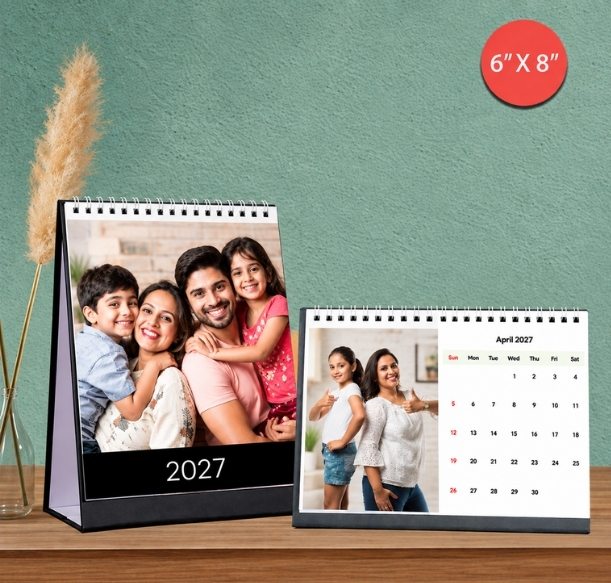
Portrait and landscape 6×8-inch desk calendar examples
Make copies for different households carefully
One family design may suit both sets of grandparents. But the names, photographs and dates might need a few changes for each household.
Keep a separate note for each version: intended recipient, photo changes, date changes and quantity. Review each version before placing its order. Do not assume that changing the quantity will automatically create personalised variations.
If siblings live in different cities, nominate one person to approve the content. Another can independently check the names and dates. That second read is particularly useful when the designer has been looking at the same pages for an hour and starts reading what they expect to see.
Order your family calendar on Photojaanic
Once your files and date list are ready, the choices become much easier.
- Open the calendar collection and choose the format for the recipient’s space.
- Select the available size, orientation and design on the relevant product page.
- Use Start Customizing to open the design journey. Confirm 2027 and your intended start month in the chosen configuration.
- Add the photographs and supported date text, then review every month.
- Check the selected product, quantity, delivery address, applicable taxes, shipping and final payable amount before paying.
For a New Year gift, check the current delivery estimate for the destination PIN code before committing to an arrival date. Estimates and charges can vary with the product and address.
Before checkout, check:
- The year and starting month are correct.
- Every month has the intended photograph.
- Faces, names and date labels are fully visible.
- Birthdays, anniversaries and spellings match the approved family list.
- Each household’s version and quantity are correct.
- The recipient’s address and contact details are accurate.
Your starting point can be modest: twelve photographs you would happily show your parents today. Choose the place where they will enjoy them, then start a personalised family calendar.
Frequently asked questions
How many photos do I need for a family photo calendar?
For a monthly layout with one main photograph per month, start with twelve pictures. Keep alternatives for cropping and add extra files if your selected design has a cover photograph or multiple image spaces. Photojaanic’s Classic wall calendar description asks for twelve favourite photos.
Which calendar should I choose for parents or grandparents?
Choose around their space and habits. A desk calendar suits a table or shelf; a wall calendar suits a shared room. Compare the actual photo area and date grid, then check whether the chosen size will be comfortable to read where it will be displayed.
Can I add family birthdays and anniversaries?
Photojaanic’s desk and Classic wall calendar pages describe adding text to date boxes. Prepare a checked list of names and dates, then review how the text fits in your selected design before ordering.
Can I use phone photos or pictures shared on WhatsApp?
Phone photographs can work when they are sharp and have enough detail for the selected image area. Prefer the original file. A shared picture may have been compressed or resized; check its dimensions, crop and any resolution warning rather than assuming every WhatsApp image is unsuitable.
Does a Photojaanic calendar have to start in January?
The desk and wall calendar pages advertise a choice of start month. Check the year and start month in your selected design before placing the order, especially when creating a birthday or mid-year gift.
Can I make a calendar when we do not have a recent family group photo?
Yes. Use smaller family groups, individual portraits, shared activities and an older photograph whose story the recipients know. A balanced collection can represent the family without putting everyone in the same picture.





Be the first one to comment