




Phone photos can look clear in a photo book. WhatsApp photos can work too, but check the actual file before you enlarge it. What matters is the detail in the image, the crop you keep and how much space the photo takes up on the printed page.
A picture that looks fine inside a chat may look soft when it fills a page. The same file might still work as a smaller picture beside a caption. You do not need to reject every photo received on WhatsApp, or buy a new phone before making a book.
If you are collecting family pictures for photo album printing, use this checklist before you spend time arranging the pages.
Why a good phone photo can still print badly
Start by separating two problems: a photo that was blurry when it was taken, and a clear photo that has lost detail along the way.
Camera shake, missed focus and a moving subject can leave the original soft. A larger file will not fix that. Check faces, eyes and any detail you want people to notice. For a group photograph, inspect the people at the sides as well as those in the middle.
A different problem happens when a photo has been reduced, compressed or captured as a screenshot. It may contain enough detail for a small display on a phone but less than you need for a large printed image.
Look at the file itself before blaming the camera or the printing. A recent phone can produce a poor picture in dim light; an older phone can produce a useful, well-lit image.
Check which version you have
For a family trip, a baby book or wedding pictures shared by relatives, you may have several copies of the same photograph. Find the clearest source before you design around it.
| Photo source | What to check | Sensible next step |
|---|---|---|
| Original camera file | Focus, dimensions and any earlier edits | Keep this as your starting copy |
| Photo received in a WhatsApp chat | Pixel dimensions and visible detail | Compare it with the sender’s original if available |
| Photo sent using WhatsApp HD | The saved file, not just the HD label | Check it at the size you want to print |
| Screenshot of a chat, status or photo | Whether the image includes screen elements or very little detail | Ask for the image file instead |
| Photographer’s gallery preview | Whether you downloaded a preview or a full-resolution file | Use the full-resolution download supplied for printing |
WhatsApp’s help guidance explains that shared media may be compressed and lower in quality than the original. Its HD option offers a higher-quality sharing choice, but the label alone does not establish that your saved copy is the untouched camera original. Sending an already reduced image again cannot recover the detail it has lost.
Ask the person who took the picture for their original file, preferably through a download method that preserves it. If they send it as a file attachment, check the received dimensions against the original. A new attachment made from a small chat copy is still a small copy.
Look at pixels before looking at megabytes
Open the image’s information or details view and look for dimensions such as 3,000 × 4,000 pixels. The exact place to find them varies by phone or photo app.
File size in MB is only a clue. Compression, image content and file format all affect it. A large file can still be out of focus, while a smaller file may be adequate for a modest photo area.
For close-viewed photo prints, 300 pixels per inch, or PPI, is a useful preparation target. It is a general reference, not a confirmed Photojaanic upload minimum or an automatic pass mark. Lower-resolution images need a judgement about the intended size and the detail that matters.
The calculation is straightforward: divide the usable pixels by the printed length in inches. Check both dimensions after cropping and use the lower result.
For example, a hypothetical 1,200 × 1,600-pixel file placed at 3 × 4 inches gives 400 PPI in both directions. At 6 × 8 inches, it gives 200 PPI. The file has not changed; the image on the page has become larger. These numbers illustrate placement size and are not measurements of a typical WhatsApp photo.
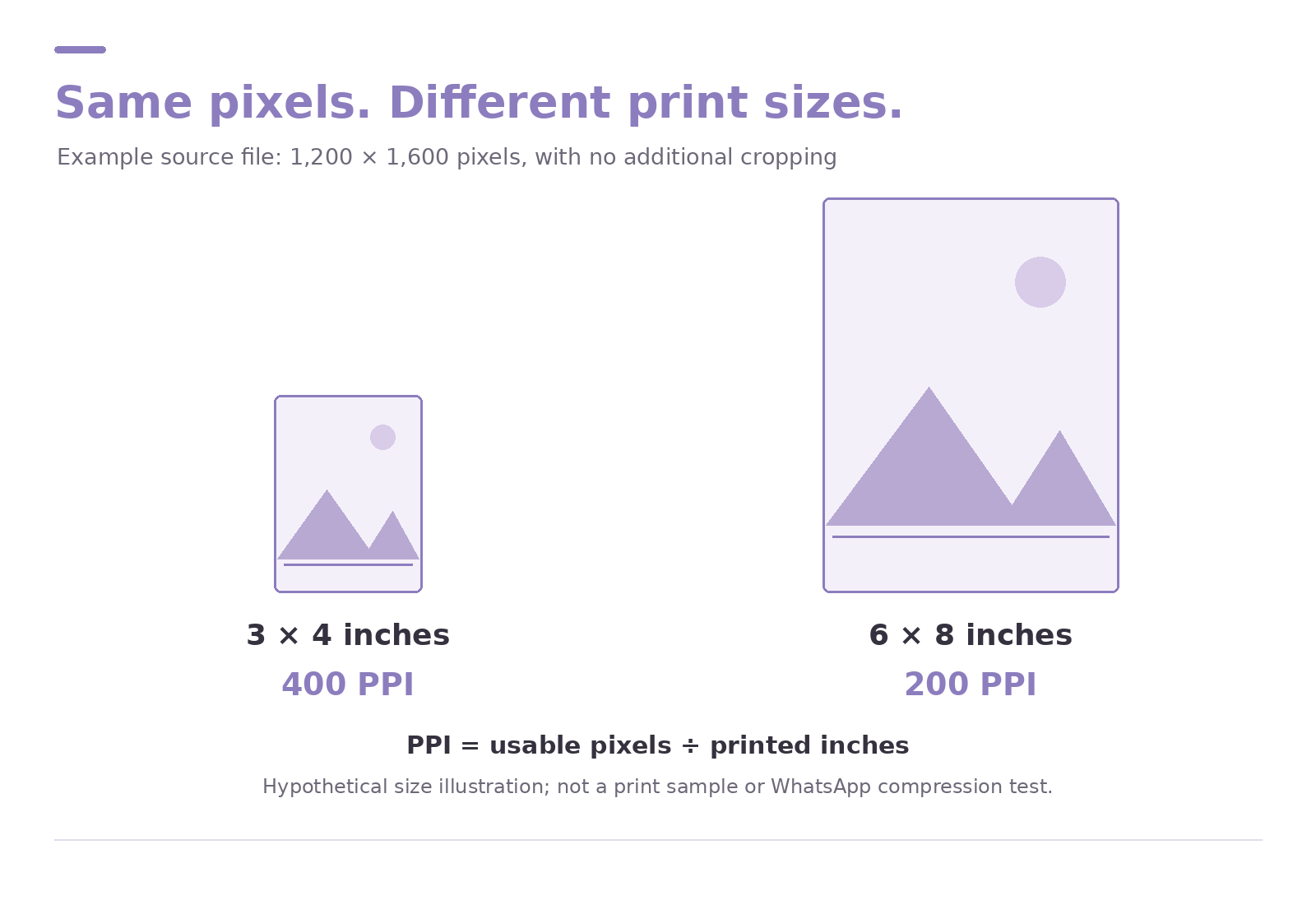
Illustration of the same pixel dimensions used at two printed sizes. It is a mathematical diagram, not a photograph of printed results or a WhatsApp compression test.
A guide to image areas and pixel dimensions
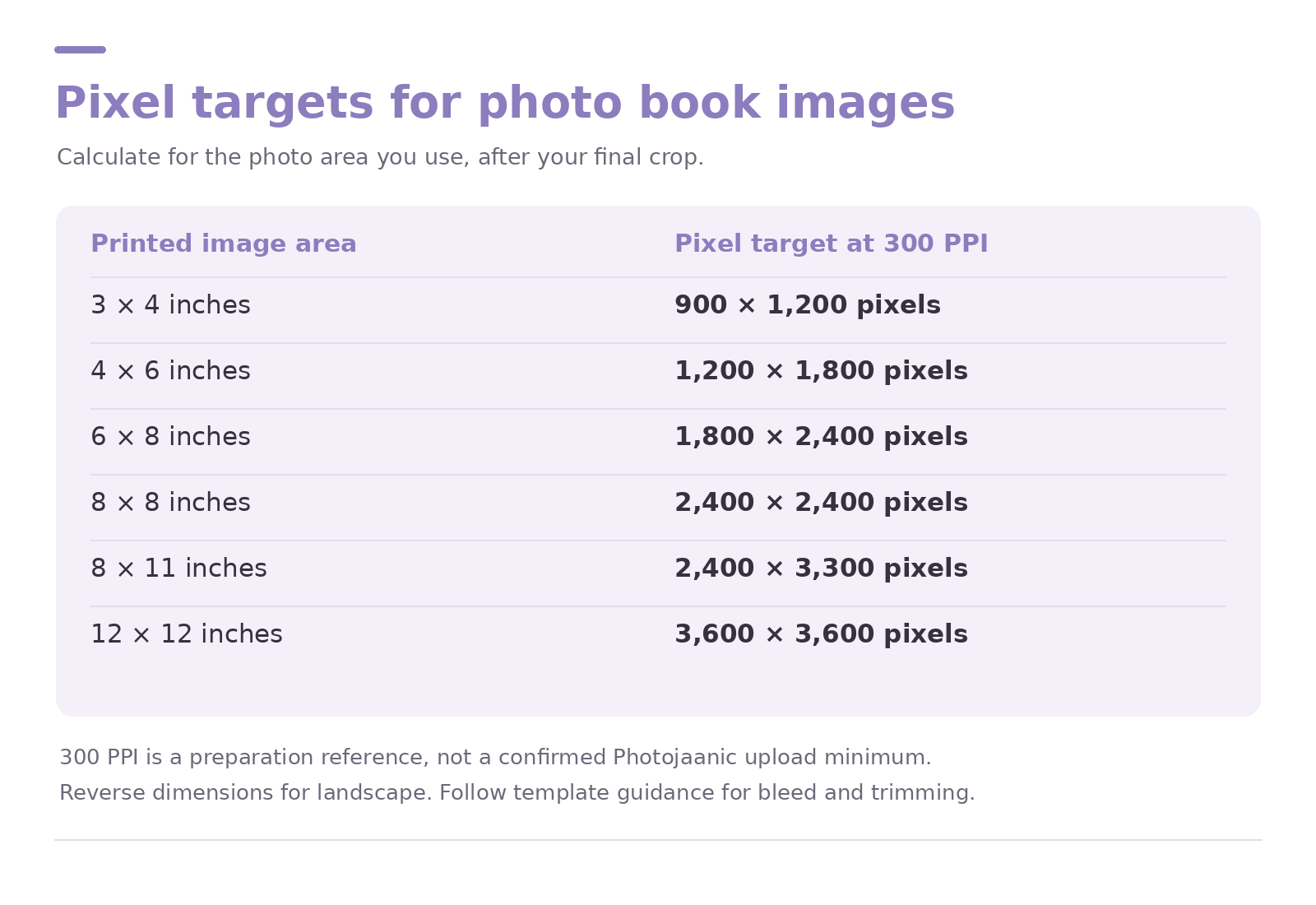
Use the table for the area occupied by a photograph, rather than assuming every image will fill the entire book page.
| Printed image area | Pixel target at 300 PPI |
|---|---|
| 3 × 4 inches | 900 × 1,200 pixels |
| 4 × 6 inches | 1,200 × 1,800 pixels |
| 6 × 8 inches | 1,800 × 2,400 pixels |
| 8 × 8 inches | 2,400 × 2,400 pixels |
| 8 × 11 inches | 2,400 × 3,300 pixels |
| 12 × 12 inches | 3,600 × 3,600 pixels |
Reverse the dimensions for the other orientation. These are basic calculations before any extra area needed for bleed or trimming. Follow the selected product’s template guidance for edge-to-edge layouts.
Changing a file’s resolution label from 72 to 300 does not create missing detail. Enlarging it with software can add estimated pixels, but that is different from recovering the original photograph.
Check the crop as well as the resolution
A square image area may cut away part of a rectangular phone photo. Zooming further into a face also removes pixels from the usable crop.
Suppose a 3,000 × 4,000-pixel portrait is cropped to a 3,000 × 3,000 square. It has enough pixels for a 10 × 10-inch image at the 300 PPI reference. If you then crop tightly to a 1,200 × 1,200 section, that reference size becomes 4 × 4 inches. The original file’s dimensions no longer describe the detail left in the crop.
Check the edges for heads, hands and text. Keep important details away from trimming guides and the centre of a spread. Avoid stretching a photo sideways to make it fit; use a different layout or crop instead.
Choose a layout that suits your files
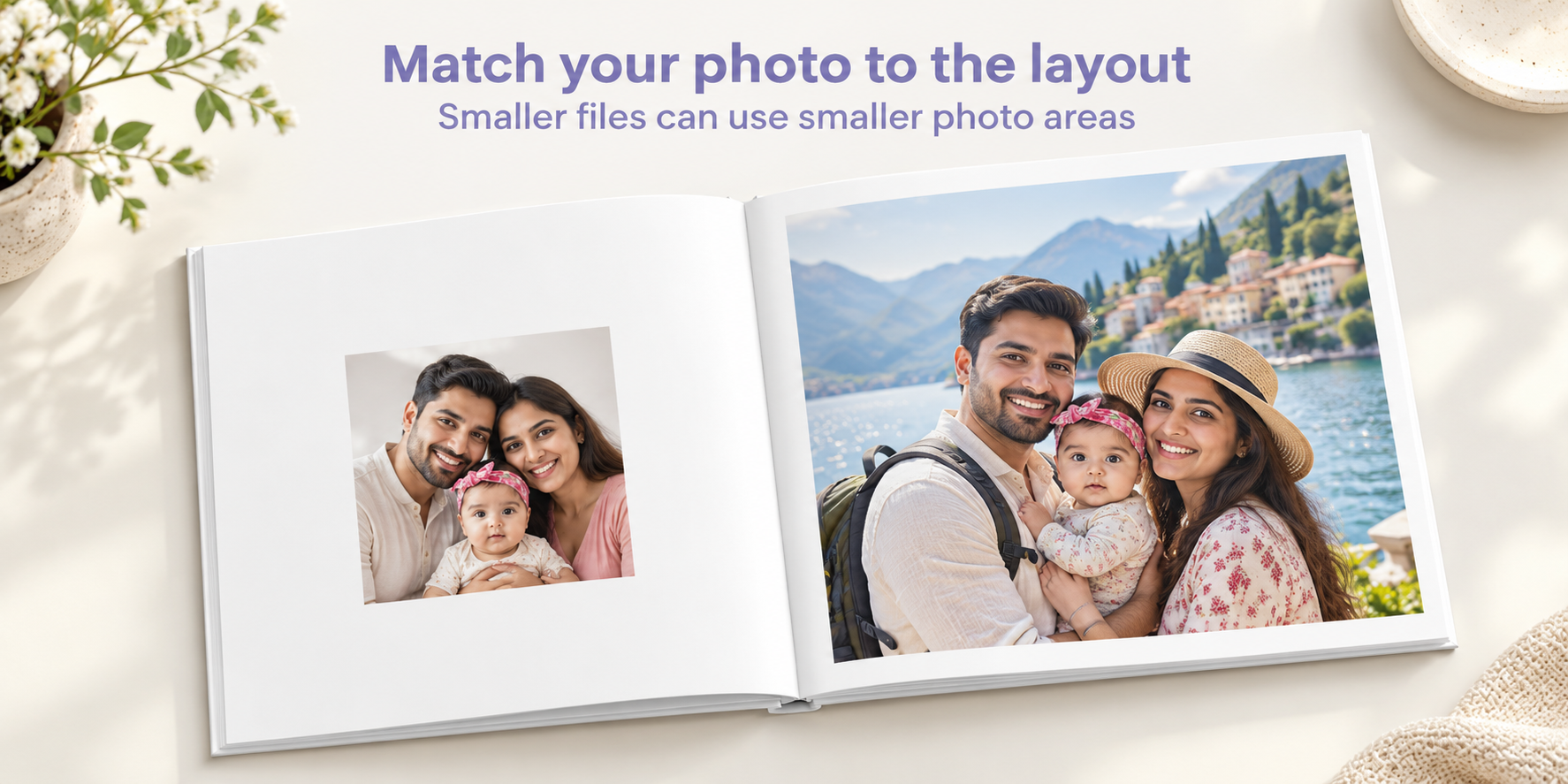
An 8 × 8-inch book does not require every photograph to be an 8 × 8-inch image. You can leave space around a smaller photo, pair it with another picture or add a caption. The same principle applies to an 8 × 11-inch or 12 × 12-inch book.
For example, keep a favourite but limited-resolution family photo in a smaller image area. Give a sharper original more space. This lets you preserve a meaningful moment without making the weakest file the cover or the largest picture in the book.
For an everyday family or travel collection, explore the custom hardcover photo book range. Its listed formats include 8 × 8, 8 × 11 and 12 × 12 inches. Confirm the size available in the particular design you choose.
If you want a photograph to run across two pages, explore a layflat photobook album. Check the resolution for the whole spread. A layout twice as wide needs enough usable pixels across that width; opening flat does not make a low-detail file sharper. Use the actual template dimensions, including any required bleed, before committing to a full-spread image.
Neither a hardcover nor a premium binding can repair a blurry source image. Choose the format for how you want to use the book, then match each photograph to a suitable layout.
When a WhatsApp photo is the only copy
You may not be able to recover an original from an old phone or a relative’s chat history. Start with the clearest version you have and give it a realistic role in the book.
Try a smaller photo area with a short caption explaining the occasion. Check whether faces remain recognisable and the details you care about are visible. Avoid a heavy crop, a large cover placement or a full spread if the file is already soft.
If the picture is badly blurred even at a modest size, consider another image from the same moment. For a photograph you cannot replace, ask support about your intended layout before ordering. An upload completing successfully is not proof that the file will look clear at every size.
Your pre-print checklist
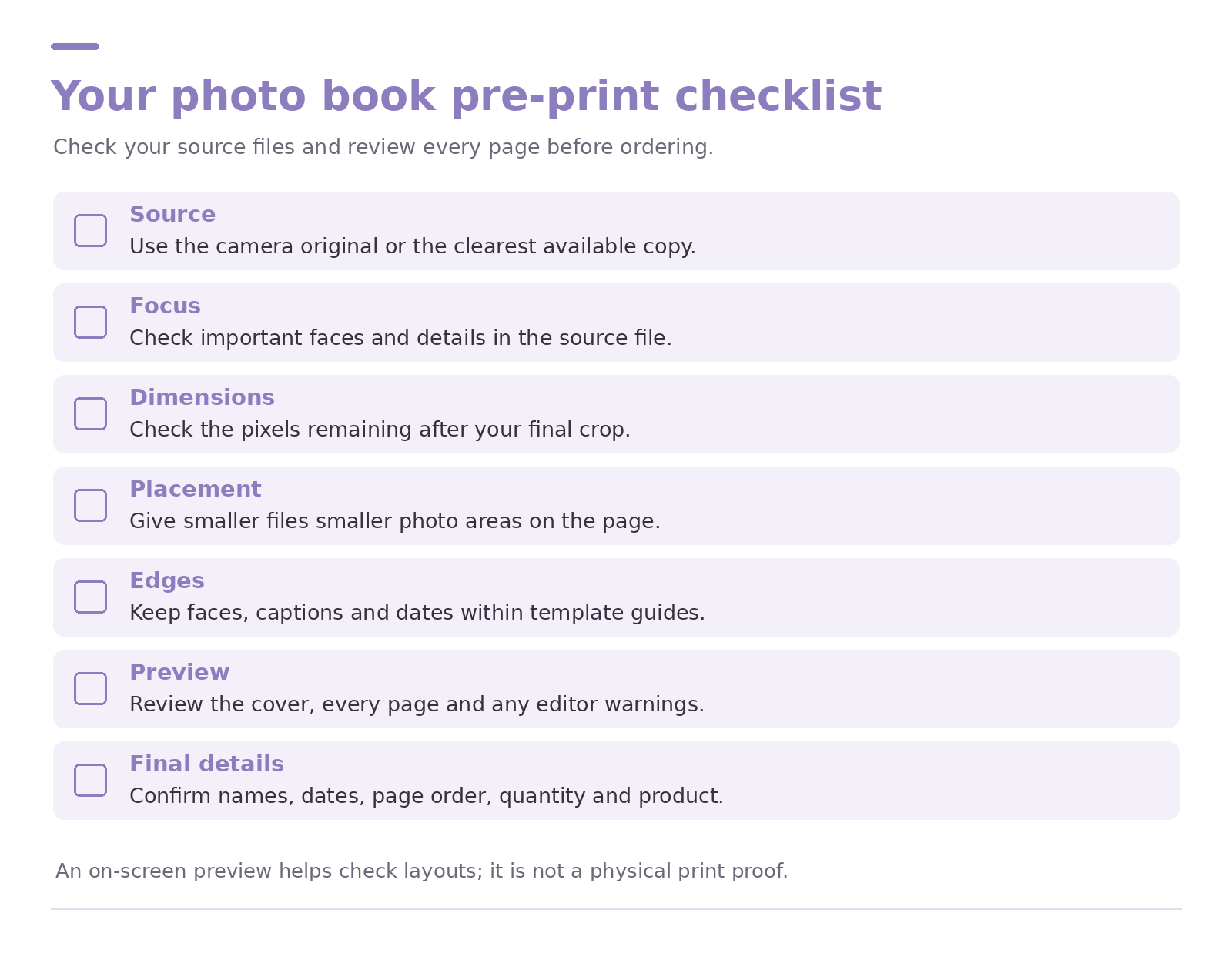
Before placing the order, check the following:
1. Source: I used the camera original or the clearest available copy wherever possible.
2. Focus: Important faces and details look clear in the source file.
3. Dimensions: I checked the pixels remaining after my final crop.
4. Placement: Smaller files occupy smaller areas rather than being enlarged automatically.
5. Edges: Faces, captions and dates sit safely within the template guides.
6. Preview: I reviewed the cover and every page, including any warnings the editor shows.
7. Final details: Names, dates, page order, quantity and the selected product are correct.
A preview helps you spot layout mistakes, but screen brightness and zoom affect what you see. It is not a physical print proof. The absence of a warning also does not guarantee sharpness.
If you are a photographer collecting client approvals, the separate album proofing checklist for photographers covers the wider approval workflow.
Common questions about photo book image quality
Are WhatsApp photos always too blurry for a photo book?
No. Check the saved file’s detail, dimensions and intended placement. Some may work in smaller areas; others need a better original. The fact that a file came through WhatsApp does not settle the answer.
Is WhatsApp HD enough for a full page?
Check the received dimensions after your intended crop and compare them with the page’s image area. HD is a sharing option, not a guarantee for every book size or layout.
Does forwarding a photo make it unusable?
The label “forwarded” does not tell you its current resolution. Inspect the file. If detail was lost earlier, forwarding the copy will not bring it back; ask the original photographer for a better version when possible.
Can a low-resolution photo work in an 8 × 8-inch book?
It may work as a smaller picture within the page. Calculate for the photo area you actually use. A small image with margins needs fewer pixels than an image filling the page.
Should I sharpen every photo before uploading?
No. Heavy sharpening can create bright edges and exaggerate noise. Keep edits gentle, retain an untouched original and check whether the result actually looks better at the intended size.
Choose your photos before you choose every layout
Gather the best available files and set aside the ones that need a closer look. Once you know which photos can take a larger placement, choose a photo album book format and start designing around them. Check the live product details, final order total and delivery estimate before paying.
Sources and further reading
WhatsApp guidance on sending media: why a shared copy may differ from the original.
WhatsApp HD photo guidance: higher-quality sharing options.
Adobe print resolution guidance: the general 300 PPI reference.
Adobe image size and resampling guidance: how pixels, placement and resampling relate.




Be the first one to comment